
Appliance deployment and requirements
The software appliance runs the TestifySec Platform in your environment. Choose the package that fits your infrastructure, then review the runtime and operational requirements for that release.
Distribution formats
| Format | What to prepare |
|---|---|
| Container | A compatible container runtime, persistent volumes, network configuration, and a process restart policy. |
| Single binary | A supported host and a service manager. Published binary targets include Linux x86-64 and ARM64, macOS Apple silicon, and Windows x86-64. |
| VM image | A compatible virtualization environment, persistent disks, and network configuration. Confirm the image format and supported hypervisor for your release. |
| AWS Marketplace instance | An AWS account, the Marketplace offer, instance capacity, persistent storage, and VPC configuration. See TestifySec on AWS. |
Packaging is a deployment choice, not a different product. These formats do not by themselves establish high availability or disconnected operation.
Single-host architecture
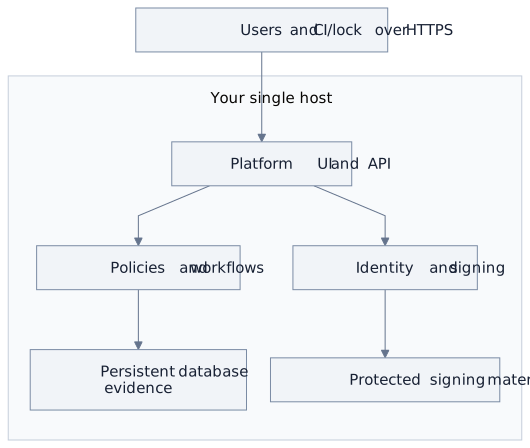
Scroll horizontally to explore the diagram, or open the full-size SVG.
Diagram source (Mermaid)
flowchart TB
  T[Users and CI/lock over HTTPS] --> API
  subgraph HOST[Your single host]
    API[Platform UI and API] --> PW[Policies and workflows]
    API --> IS[Identity and signing]
    PW --> DATA[Persistent database and evidence]
    IS --> ROOT[Protected signing material]
  end
The single-host profile includes the web UI, API, identity, signing services, workflows, and evidence storage. Its default relational store is SQLite. Evidence files can live on local disk; configured object storage changes the data path.
Host and capacity
A documented Linux evaluation used Ubuntu 24.04 LTS, 2 vCPU, 8 GiB RAM, and a 40 GiB disk. This was a small validation workload on an integration build. It is not a production minimum, benchmark, or capacity guarantee.
Size the environment for concurrent workflows, evidence sizes, retention, connected services, and recovery objectives. Confirm the release-specific requirements before production use.
Persistent state and signing material
For the standalone binary, configure a persistent, writable STANDALONE_DIR. Its temporary default is cleared when the process exits. For a container, persist the corresponding data directory on a durable volume.
Back up the database, evidence files, configuration, and required signing material together under an access-controlled recovery plan. Protect root signing material separately from ordinary configuration. A lost signing root can invalidate derived credentials; do not treat generating a new root as restoring the old identity.
License and identity
The appliance requires a valid signed license. The local license check verifies the license file; this does not mean every configured feature operates without network access.
Provision an initial administrator and choose local or federated identity. External identity providers require connectivity to their discovery, key, and authentication endpoints. Keep the system clock accurate for license and certificate checks.
Network requirements
| Connection | Requirement |
|---|---|
| Users and CI runners to the appliance | A stable DNS name and HTTPS endpoint, normally TCP 443, with a certificate trusted by clients. |
| Administration | Restrict administrative access to authorized operators and your chosen management network. |
| Internal services | Do not expose standalone signing-service and metrics ports to users or CI runners. The documented binary profile keeps ports 5554 and 9090 private. |
| Git hosts and identity providers | Permit the endpoints used by the configured integration. Webhook integrations can also require inbound reachability. |
| Object storage, email, or AI services | Review destination, credentials, data sent, and retention for each enabled provider. These connections are configuration-dependent. |
| Updates | Plan how verified release packages and replacement licenses reach the environment. |
This is a planning checklist, not an exhaustive firewall allowlist. Restricted-network or disconnected operation must be validated with the exact version, enabled features, and network policy. Do not infer zero egress from local signing or local storage alone.
Operations and availability
Your team operates the host, access, network, storage, monitoring, backup, restore, and update procedures. TestifySec supplies the software, release packages, documentation, and support under your agreement.
The packaged single-host profile has no built-in failover. Multi-replica deployments need a separately planned architecture. Test the full restore and application cutover in your environment; successful database recovery alone does not establish service recovery.
Next steps
Plan an appliance evaluation, review the shared architecture, and understand the signing trust boundary.